
Everything it takes to turn a quiz into booked clients
Build it, score it, brand it, publish it — then capture the lead, follow it up, and see exactly where people convert.
RooQuiz is a lead-generation quiz platform. You build an assessment from a template or a blank canvas with 16 question types, score it three ways — points with score bands, weighted multi-dimension scored quizzes rendered as radar charts, or personality-style outcome types — and publish it as a link, QR code, inline embed or popup. Every result page can carry its own call to action per score band, including a 1:1 booking slot picker, and every submission lands in a built-in lead pipeline with list and board views, custom stages, owners, tags and comments. Quizzes run in nine languages, and the data reaches your stack through Email, Slack, Kit, Zapier, HMAC-signed webhooks, a REST API and an MCP server with 45+ tools.
Every quiz runs a growth loop
It's not a one-way funnel. Each visitor you turn into a lead helps bring the next one — so your quiz keeps working long after you publish.
- 01Viewed
Reach
Your link, share card and search preview get found.
- 02Started
Engage
A curious hook pulls visitors in to start answering.
- 03Submitted
Score
Answers turn into a personalized score.
- 04CoreLead Captured
Capture
They leave an email to unlock results — a new lead, saved automatically.
- 05Report Viewed
Reveal
They get a tailored report: score, strengths and gaps.
- 06CTA Clicked
Convert
A result-based CTA sends them to book, buy or sign up.
- 07Shared
Re-share
They share their result, sending new visitors back.
Three formats, one editor
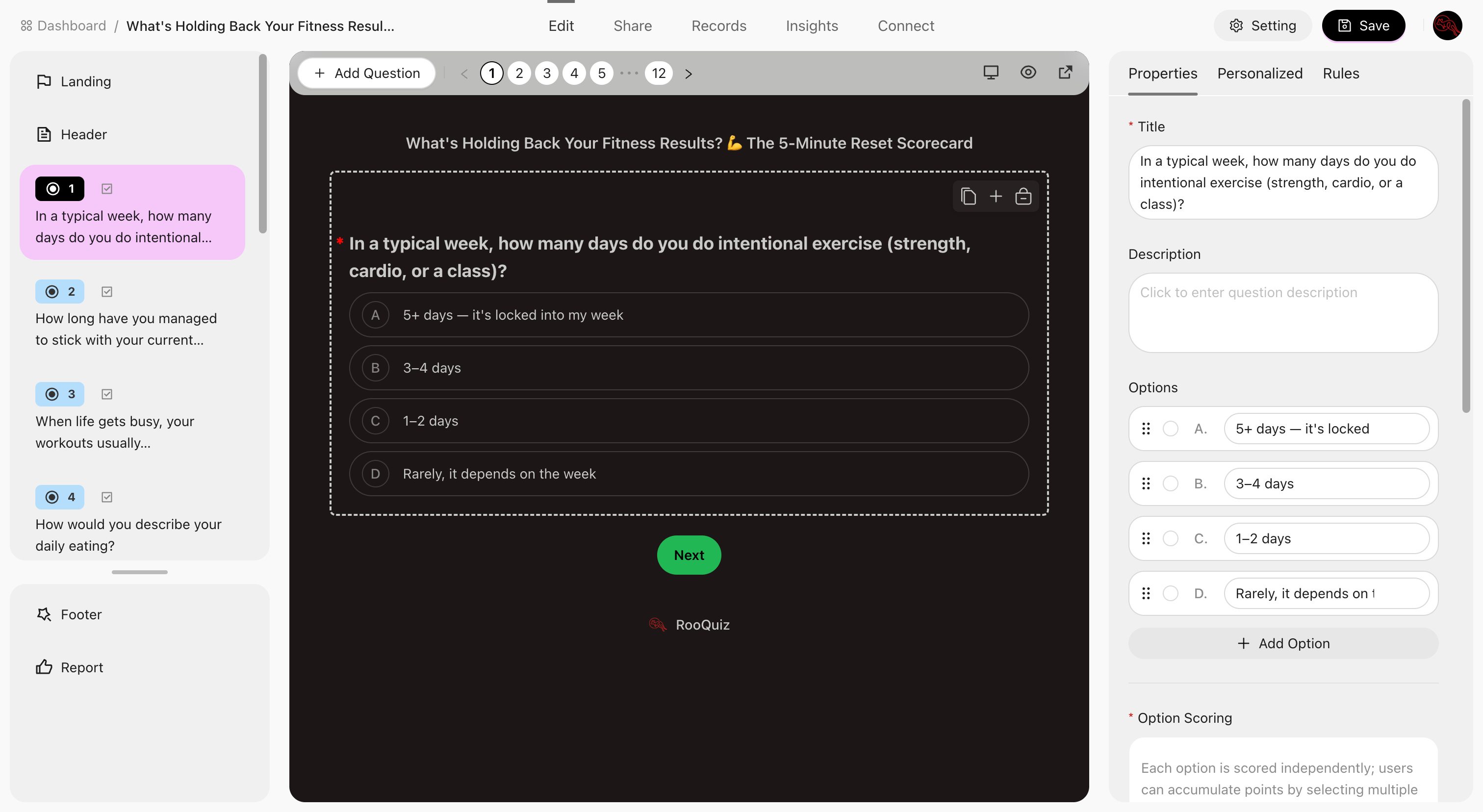
Start from a template or a blank canvas. Drag questions into place, watch the live preview update as you type, and pull from a reusable question bank when you need more.
- Knowledge, scored or outcome quizKnowledge quizzes with right answers, weighted scored quizzes, or personality-style outcome types — and knowledge quizzes can draw a fresh set of questions on every attempt.
- 16 question typesSingle and multiple choice with images, dropdown, cascading select, true/false, rating, number, fill-in-the-blank, ordering, date and time — plus statements, carousels, page breaks, personalized modules and random question groups.
- Conditional logicShow or hide later questions based on earlier answers, with eight comparison operators. Available on scored quizzes.
- Question banksKeep a reusable library and let each attempt draw a group of questions by type, count and points — no two respondents get the same set.
- Templates that already workStart from a published template built for coaches, consultants and creators, then make every question your own.
- Or let an AI agent build itConnect Claude or any MCP client and have it create the quiz, add questions and wire up the report for you.
It should look like you, not like a form tool
Theme it, put a real landing page in front of it, and make the answering experience something people actually finish.
Read the quiz design guide →32 themes, or your own
Pick a theme, then tune eight semantic colors, corner radius, control size and borders — or pull a palette straight out of an image.
A landing page before question one
Give the quiz a cover image, a headline and a description, with optional modules stacked above the start button.
Built for real respondents
Time limits with a countdown, an answer sheet for long quizzes, and drafts that save themselves so nobody loses their answers.
Nine languages, one quiz
Translate the title, questions, options, report copy and system text line by line against the source. Respondents land in their own language.
Bot protection built in
Cloudflare Turnstile keeps junk submissions out of your lead list without putting a puzzle in front of real people.
Your domain, your brand
Serve quizzes from your own custom domain and drop RooQuiz branding on Pro.
Score it your way — points, dimensions or types
Three engines, one report. Pick the one that matches the story you want the result page to tell.
Read the scoring guide →Points and score bands
Set a correct answer and points per question, then define score bands with their own label, color and copy.
Weighted scored quizzes
Group questions into dimensions with weights and standard scores, and render the result as a radar chart.
Outcome types
Map each option to a result type and let the votes decide which one a respondent gets — each with its own image, description and CTA.
A real formula editor
Write your own scoring formula with variable autocomplete, a function reference and inline validation.
AI grading for open answers
Score free-text answers against a reference answer and get back the points covered plus the reasoning.
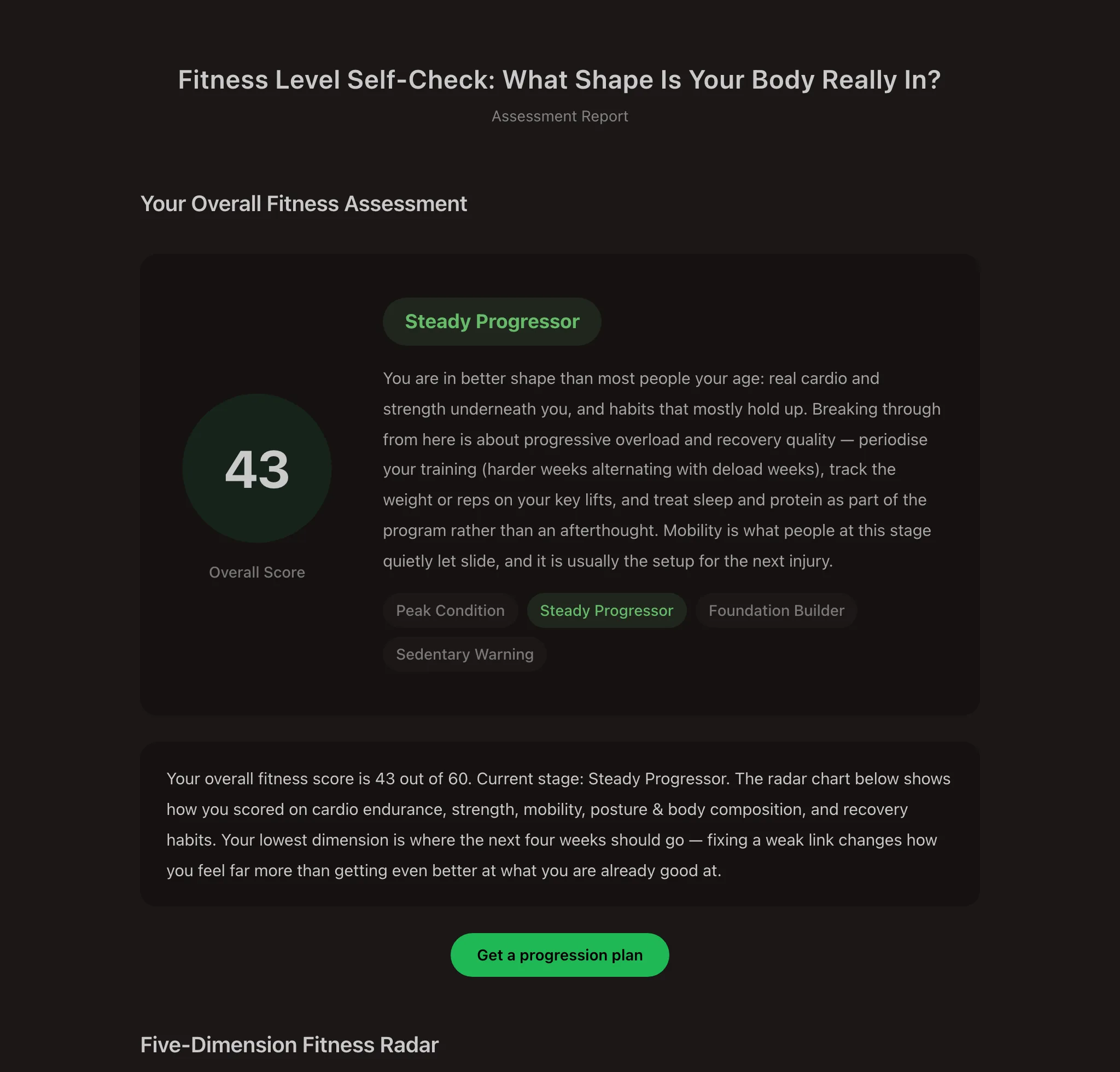
The result page is the sales page
Every submission gets a report — and every report can point at the next step, whether that is a booked call, a download or a subscription.
- A report for every submissionScores, dimension breakdown, per-question feedback and your own summary copy — generated the moment someone finishes.
- A different CTA per resultEvery score band and every outcome type carries its own button: book a call, download the guide, subscribe.
- Book the call right thereRespondents pick a slot in their own timezone. You set session length, buffers, notice period, capacity, and whether you approve first.
- Gate the reportLeave it open, ask people to sign in to see their report, or require sign-in to take the quiz. The middle option turns every report into a lead.
- Made to be sharedA downloadable result card plus six share channels, each link tagged so you can see the traffic a result sends back.
- Email the resultSend respondents their report automatically when they finish, from a template you control.
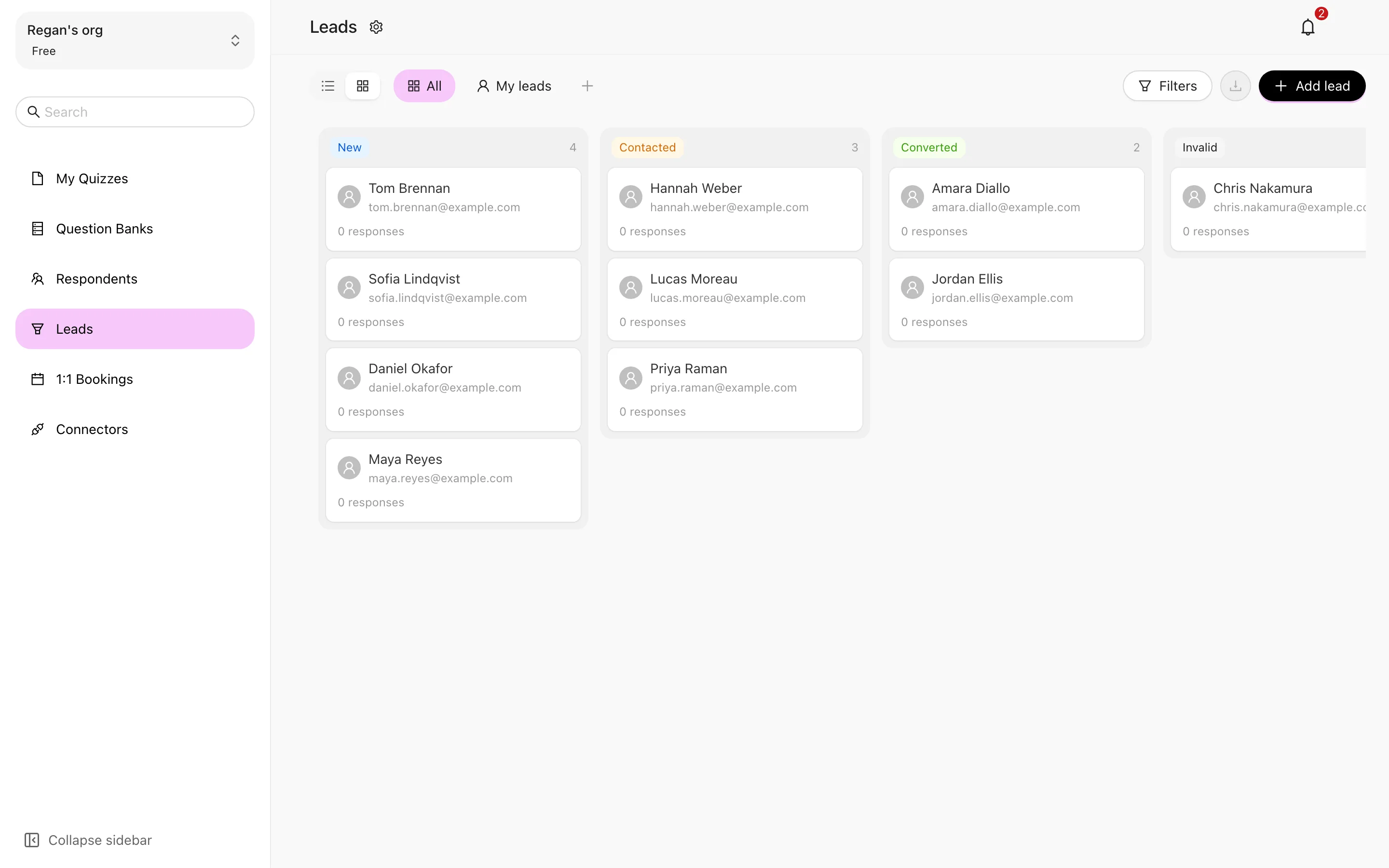
Every submission becomes a lead you can actually work
Not a CSV you export and forget — a pipeline that lives next to the quiz, with stages, owners and a full history per person.
- List and board, same dataScan the table when you want density, drag cards across stages when you want momentum.
- Stages you name yourselfRename and recolor the built-in stages or add your own, so the board matches how you actually sell.
- Owners, tags, commentsAssign a teammate, mark leads with colored tags, leave notes, and read the full activity trail on every person.
- Saved viewsSave the filter combinations you use every day and jump straight back into them.
- Add leads by handSomeone came in from a call instead of the quiz? Add them directly — a matching email merges into the person you already have.
- Respondent profilesA directory of everyone who has ever answered, with custom extended fields on top of the built-in ones.
Publish it, plug it in, and watch the funnel
Get the quiz in front of people, push the data where your team already works, and find out exactly where the funnel leaks.
Explore the MCP integration →Publish anywhere
A share link and QR code, plus inline, popup and iframe embeds that size themselves to the host page.
A promotion kit in the box
Three social posts, an email and a bio link — written in your quiz's language, each with its own tracking link.
Five ways to connect
Email, HMAC-signed webhooks, Slack, Zapier and Kit — fired by new leads and booking events, scoped to the quizzes you choose.
See where people drop
A conversion funnel with drop-off points, submission trends, channel attribution and per-question answer distribution.
Your data, exportable
Export answers, leads or respondents. Large exports are built in the background and delivered as a file.
Team, roles and audit
Owner, admin, member and viewer roles across as many teams as you run, with an audit log of what changed and who did it.
API and MCP
A REST API with an OpenAPI spec, and an MCP server with 45+ tools that any AI agent can drive over OAuth.
The full list
Everything above in one place. Pick a line to jump to the section that explains it.
- Template library
- Graded quizzes
- Weighted scored quizzes
- Outcome quizzes
- Random question quizzes
- 16 question types
- Images on answer options
- Conditional show / hide logic
- Question banks
- Live preview while editing
- Open and close a quiz anytime
- Trash with restore
- 32 built-in themes
- Eight semantic color slots
- Radius, size and border controls
- Palette from an image
- Landing page with cover
- Time limit and countdown
- Answer sheet
- Draft autosave and resume
- Turnstile bot protection
- Nine-language translations
- Editable system copy
- Custom domain
- Remove RooQuiz branding
- Points per correct answer
- Score bands with colors
- Weighted dimensions
- Standard scores
- Radar charts
- Outcome mapping
- Custom formula editor
- AI grading for open text
- Regenerate a report
- Auto-generated reports
- CTA per score band
- CTA per outcome type
- Report sign-in gate
- 1:1 booking on the result page
- Timezone-aware slots
- Booking approval and rescheduling
- Downloadable result card
- Six share channels
- Share-back attribution
- Automatic result emails
- Public result pages
- Lead list and board
- Custom pipeline stages
- Lead owners
- Colored tags
- Comments and activity trail
- Saved filter views
- Manual lead entry
- Respondent directory
- Custom extended fields
- Share links and QR codes
- Inline, popup and iframe embeds
- Open Graph share cards
- UTM link builder
- Promotion kit
- Email notifications
- HMAC-signed webhooks
- Slack, Zapier and Kit
- Conversion funnel and drop-off
- Trends and channel attribution
- Answer distribution
- Answer, lead and respondent export
- Google Analytics
- Owner, admin, member, viewer roles
- Multiple teams
- Audit log
- REST API and OpenAPI spec
- MCP server with 45+ tools
Want to know what's in Free and what's in Pro? Compare plans →
Built for teams that ship every week
Quizzes & responses on every plan
Run as many quizzes as your team needs — every response is stored and analyzed, no monthly cap.
Free Pro trial
Try every premium capability free for 7 days before you commit.
Annual billing
Switch to yearly and the price drops automatically. Pro starts at $20 / month.
Frequently asked questions
Built on a secure foundation
Infrastructure security
Runs on Cloudflare's global network with TLS on every connection; the database is hosted on AWS and backed up daily.
Application security
Bot protection with Cloudflare Turnstile, rate limits on sign-in and sign-up, and HMAC-signed webhooks.
Data security
Role-based access for owners, admins and members, plus an audit log kept for 90 days on Free and 365 days on Pro.
Privacy & compliance
A public Data Processing Agreement with Standard Contractual Clauses for international transfers, and a published sub-processor list.
Publish your first quiz free.
Unlimited quizzes, unlimited responses, no credit card. Upgrade to Pro when you need custom branding and your own domain.