
Compass
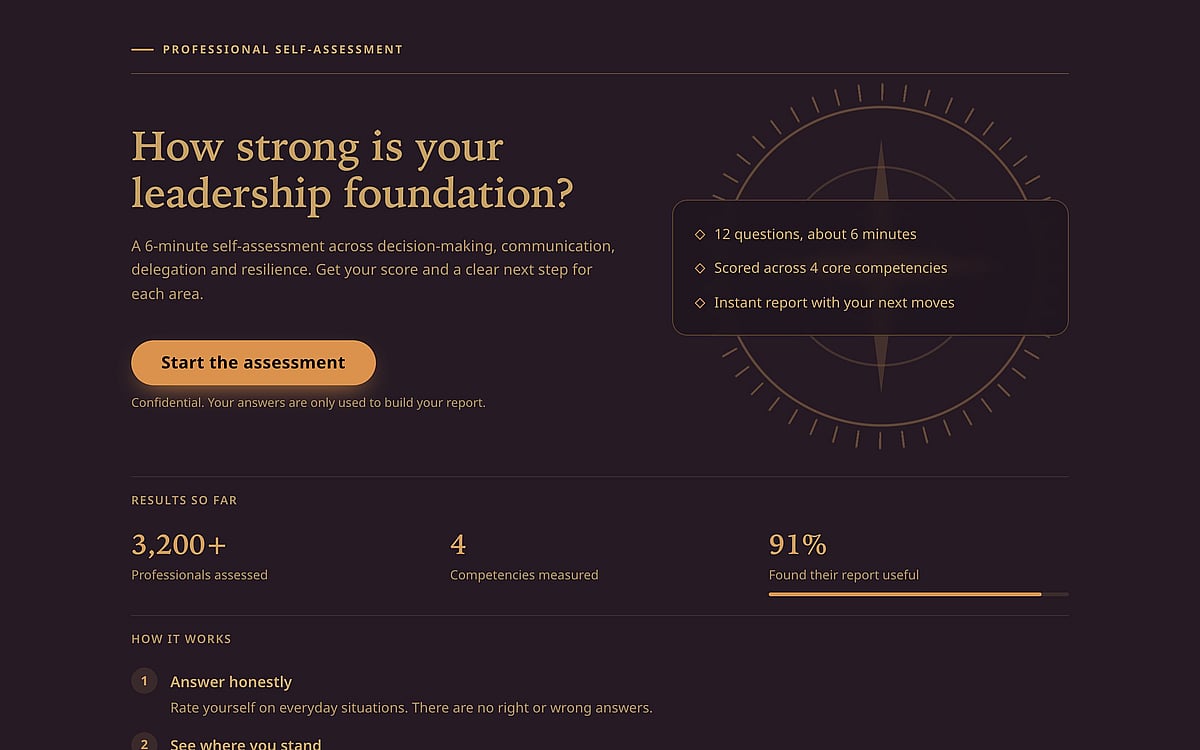
Premium dark assessment look with serif questions, accent-colored rating dials, a thin progress bar and a gauge result, built for leadership and skills self-assessments.
Free teams can build and edit with this theme; it shows on your published quiz once you're on Pro. See pricing
Preview
Colour schemes
Compass comes in 7 colour schemes. You can switch between them any time in the quiz editor.
- coffeeDefault
- luxury
- night
- business
- bumblebee
- nord
- corporate
What's included
Everything here comes with the theme. In the quiz editor you can edit, reorder or remove any section.
Start page sections
- StatsA few big numbers that show your results or reach.
- StepsHow it works, in a few numbered steps.
- TestimonialsQuotes from clients or students.
Quiz and results
- Progress: Progress barA bar fills up as people answer, with a count at the end.
- Score card: GaugeA half-circle gauge points to the score.
Who it's for
Compass was designed with these quizzes and audiences in mind:
Screenshots
How to use this theme
- Click "Use this theme" to copy the sample quiz into your account — the theme comes with it.
- Replace the questions and results with your own; the design stays.
- Already have a quiz? Open Design in the quiz editor and pick this theme.
Questions about this theme
Is Compass free to use?
Compass is a Pro theme. On the Free plan you can still build and edit a quiz with it; your published quiz shows the theme once your team is on Pro, and falls back to the default look if you downgrade.
Can I change the colours?
Yes. Compass comes with several colour schemes, and you can switch between them any time in the quiz editor's design settings.
Can I use Compass on a quiz I already have?
Yes. Open the quiz in the editor, go to the design settings and choose Compass. Your questions and results stay as they are.
Does it work on phones?
Yes. Every RooQuiz theme adapts to small screens. Use the Mobile switch on the live preview to see how Compass looks on a phone.
Can I get a version made for my brand?
Yes. Our designers can build a theme just for your team, starting at $300 on the Pro plan. See Custom quiz design for details.
More themes
All themes
Need a look of your own?
Our designers can build a theme just for your brand.
Custom quiz design